Cost Projection is a Property Meld feature powered by MAX that estimates a likely cost range for a Meld (work order). It uses a statistical model built from historical invoice and expenditure data, combined with the Meld’s taxonomy (for example, item, symptom, component, and location details).
Note: TrueCost is currently in beta and available to all customers on our Ops tier plan. If you’re not on the Ops tier but are interested in learning more about TrueCost, please reach out to your Customer Success Manager.
Where you will see Cost Projection
Meld header
Appears on Pending Assignment Melds that do not already have an existing estimate.
"Get an estimate" button
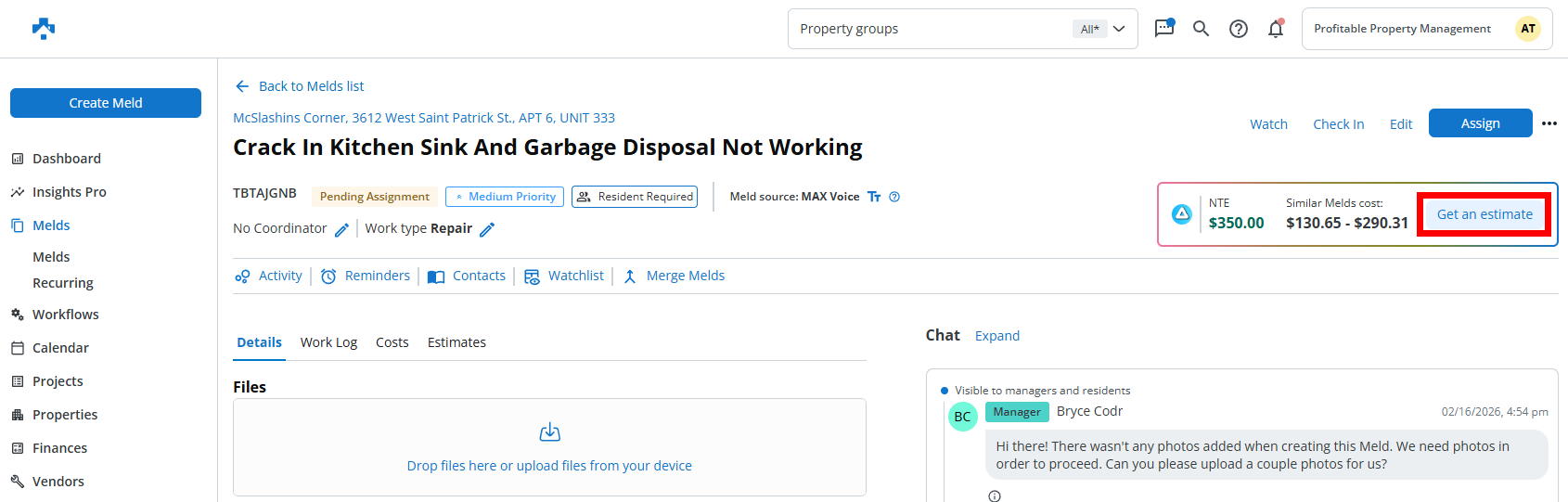
What the Cost Projection card shows
Maintenance Limit (NTE)
If an NTE (not to exceed) is set for the property, it is shown on the card.
Estimated Cost Range
Shows an estimated low-to-high cost range derived from historical invoice-based data.
Get Estimate
Select Get an estimate to choose either "Request Estimate" or "Create Estimate":
Alerts and what they mean
The card may display one alert message based on the most relevant scenario for the Meld.
Wide cost range
Indicates the work type can vary significantly in cost and may often exceed the average.
{add screenshot}
Estimate exceeds your NTE
Shown when the projected average cost is higher than the property’s Not to Exceed value.
No NTE set
Indicates the property does not have a configured Not to Exceed value.
Recommendation to get an estimate
In some cases, the card may recommend getting an estimate when projected costs frequently exceed an industry standard reference point.
Viewing more details
Select the MAX indicator on the card to open a popover that includes:
A static graph image with low and high values used for the range
Notes and limitations
Cost Projection is an estimate, not a guaranteed price. Actual costs depend on site conditions, scope, vendor pricing, and other factors.
The card appears only when Cost Projection is enabled for your account and when the Meld meets the criteria for display.